

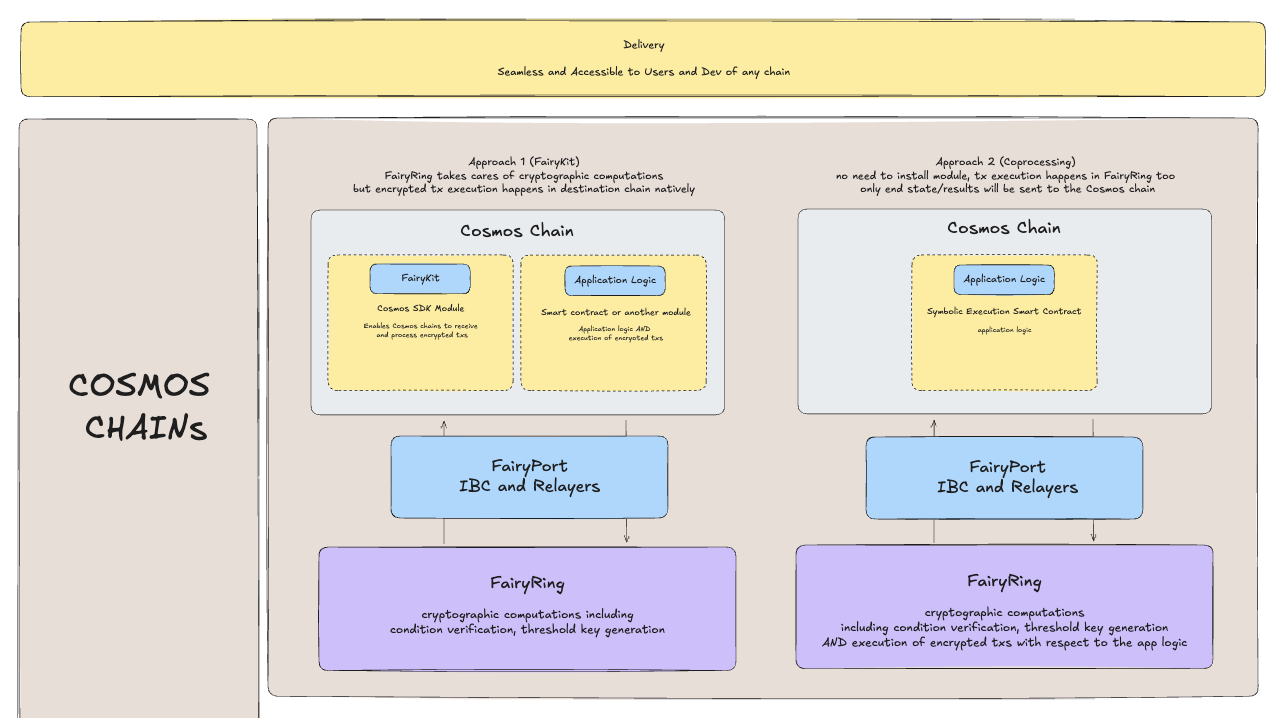
 A key aspect to note is that all of these integration methods provide the functionality to interact with FairyRing, and there can be underlying application logic working with these integrations.
At a more granular level, Cosmos gateway contracts integrate using the following one or more of the following methods:
A key aspect to note is that all of these integration methods provide the functionality to interact with FairyRing, and there can be underlying application logic working with these integrations.
At a more granular level, Cosmos gateway contracts integrate using the following one or more of the following methods:
- Module Integration
- Smart Contract Integration
- Underlying Execution Logic Integration
- A Combination of Any of the Above
privgov tutorial covers a subset of the gateway contract methods available for Cosmos integration with Fairblock. Specifically, it is a combination of the underlying application logic and a mixture of the x/pep module details, that collectively construct today’s privgov integration package.
These four methods can each be used to implement app logic integrating with FairyRing, even the application of interest today, privgov.
Cosmos Appchain Integration
In this section, we briefly go over the different ways to integrate with Fairyring.You have two main options:
- Direct PEP Integration: Integrate the
x/pepmodule directly into your app-chain for minimal implementation effort. - Custom Integration: Build custom communication logic and interact with Fairyring via IBC.
Integration Comparison
Depending on the requirements and complexity of your appchain, you can choose either a fast plug-and-play integration or a fully customizable confidential workflow.The table below outlines the key differences between the two methods.
Direct PEP Integration abstracts the interaction with Fairyring and handles decryption flows automatically. Custom Integration offers full flexibility but requires the appchain to manage IBC communication directly with the keyshare module.
Direct PEP Integration
Thex/pep module can be directly incorporated into any Cosmos SDK-based application chain to enable seamless privacy integration with Fairblock’s FairyRing network.
This approach provides a minimal-overhead method for allowing encrypted transactions and automatic decryption/execution flows.
Overview
By integrating thex/pep module into your chain:
- Your chain can connect to the FairyRing chain, constantly updating its Master Public Key (MPK) and automatically retrieving decryption keys as they are generated.
- Users can submit encrypted transactions on your chain, which will be automatically decrypted and executed once the appropriate decryption keys are available from FairyRing.
How to Integrate
Integrating thex/pep module is similar to integrating a standard Cosmos SDK module, such as bank or staking.
You need to:
- Import the
x/pepmodule in your codebase. - Wire the module in your
app.go. - Set the module parameters correctly (especially
is_source_chain = false).
1. Import the PEP Module
In yourapp.go:
2. Add Keeper to Your App
Declare the PEP Keeper inside yourApp struct:
NewApp function:
3. Register the Module
Addpepmodule.NewAppModule to your list of modules:
4. Configure Genesis Parameters Carefully
One critical parameter is:is_source_chain: false tells the x/pep module that this chain is a consumer of decryption keys from FairyRing, rather than producing its own.
If you leave this value true by mistake, your PEP module will not properly connect to FairyRing and decryption flows will fail.
Final Notes
After completing these changes:- Your appchain will automatically monitor FairyRing for new decryption keys.
- Encrypted transactions submitted by users will be automatically processed once decryption material is available.
- You have enabled native confidential compute workflows inside your chain with minimal custom effort.
Custom Integration
Custom integration provides greater flexibility by allowing the appchain to directly communicate with FairyRing’sx/keyshare module over IBC.
This method requires the appchain to handle the logic for initiating IBC transactions to FairyRing and processing the corresponding responses. While it provides full control over encryption workflows, it demands more effort compared to direct x/pep integration.
Overview
In the custom integration path:- The appchain establishes direct IBC communication with FairyRing’s
keysharemodule. - The appchain must manage when to send IBC requests and how to handle IBC acknowledgments and responses.
- Responsibility for queueing, timeout handling, retries, and state management lies with the appchain.
Available IBC Endpoints
FairyRing’sx/keyshare module provides several IBC packet types that the appchain can interact with. Below is a summary of each available packet and its purpose.
RequestDecryptionKeyPacketData
Used by the appchain to request an identity from FairyRing.This initiates the process of generating an encrypted identity and eventually obtaining its corresponding decryption key.
GetDecryptionKeyPacketData
Used by the appchain to request a decryption key for an already existing identity from FairyRing.This packet is useful when the identity has already been requested previously, and only the key material is now needed.
DecryptionKeyDataPacketData
Sent by FairyRing to the appchain when a decryption key has been generated.The appchain must be able to handle and consume this packet appropriately, such as by unlocking transactions encrypted under that identity.
RequestPrivateDecryptionKeyPacketData
Used by the appchain to request the generation of a private identity on FairyRing.Private identities enable use cases where fine-grained access control is desired, such as user-specific confidential data.
GetPrivateDecryptionKeyPacketData
Used by the appchain to request a list of encrypted keyshares for an existing private identity from FairyRing.This is part of enabling the private decryption workflow, where key material must be assembled in a privacy-preserving manner.
PrivateDecryptionKeyDataPacketData
Sent by FairyRing to the appchain containing the list of encrypted keyshares corresponding to a private identity.The appchain must process this packet to reconstruct the private key securely when appropriate.
CurrentKeysPacketData
Used by the appchain to fetch the latest active and queued Master Public Keys (MPKs) from FairyRing.This is critical to ensure that encryption operations on the appchain are always performed using the correct public key material.
General Integration Approach
Custom integration requires the appchain to:- Establish an IBC connection with the FairyRing chain targeting the
keysharemodule. - Build and send IBC packets according to the desired workflow (e.g., requesting an identity, fetching decryption keys).
- Handle incoming packets (e.g., decryption keys, keyshares) in the IBC packet handler logic.
- Maintain local state, retries, timeouts, and re-request logic as necessary.
Example Code Snippets
Sending a RequestDecryptionKeyPacket
Handling a DecryptionKeyDataPacket
Important Considerations
- IBC setup: Ensure a stable IBC connection exists with the FairyRing chain before sending any packets.
- Timeouts: Handle packet timeouts properly to avoid dangling requests.
- Retries: Implement retry logic where necessary, especially for long-lived decryption key generation processes.
- State management: Track pending identities and decryption keys cleanly in your appchain’s state.